
Most keyword advice sends you somewhere else to look for ideas.
It tells you to open a paid tool, study competitor websites, chase search-volume numbers, or keep scrolling until something looks easy enough to write about.
I use those things when they make sense. But one of the most useful places to look is already inside Google Search Console. Your own data can show the longer, more specific searches where Google has started connecting your site with a question.
That does not mean every search is a new article idea. It definitely does not mean Google is hiding some secret pile of keywords that one magic trick will reveal.
What it does mean is that you can use a simple filter to cut out a lot of short, broad searches and see the longer phrases people are using. Those longer searches often make a person’s real problem much easier to understand.
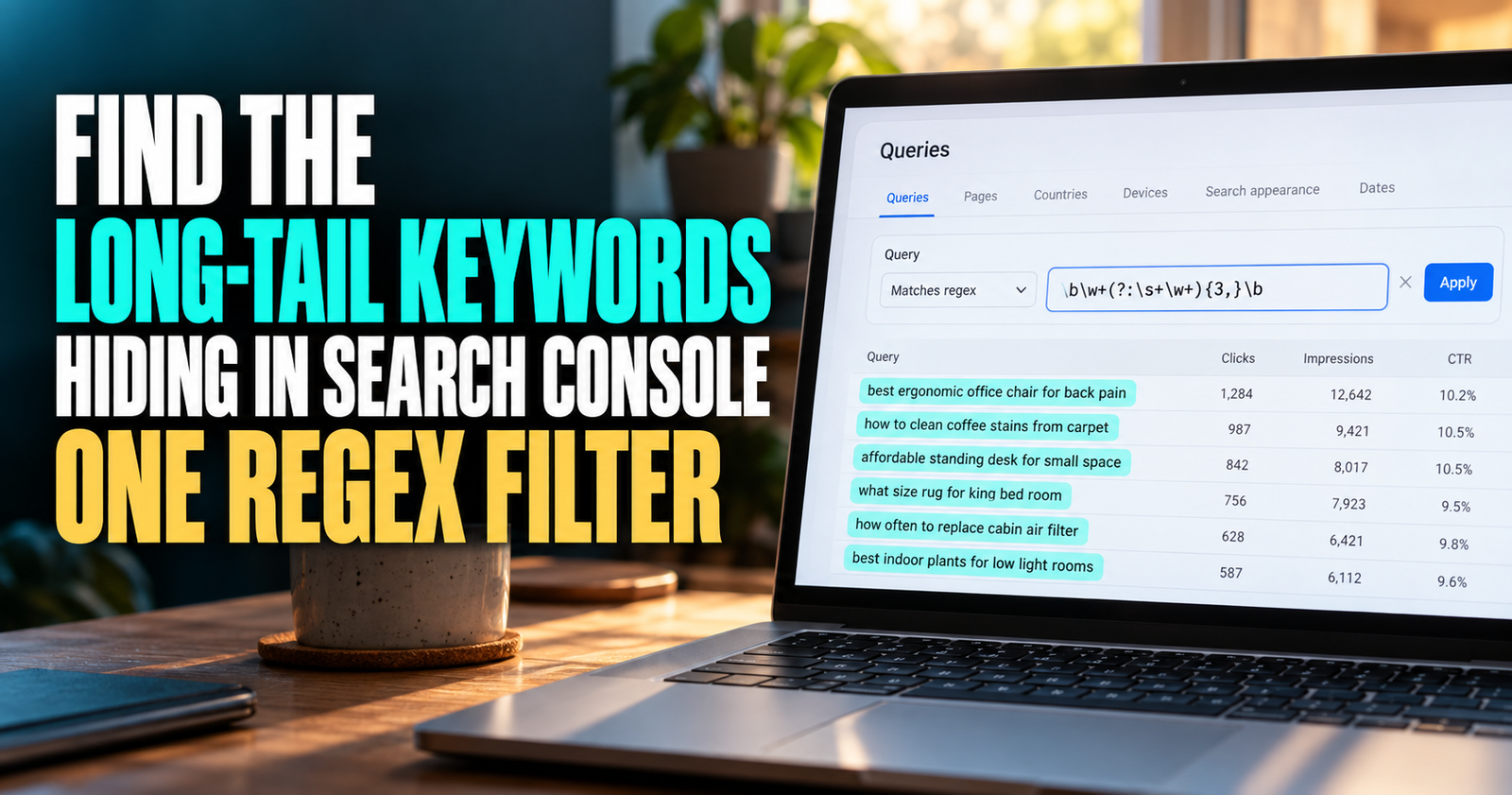
The trick is called regex. The name sounds more complicated than the job it does.
What this Google Search Console regex filter actually does
Regex is short for regular expression. It is a pattern you can use to filter words and phrases.
In this case, the pattern filters your Search Console query report so it shows searches with a certain number of words.
The most useful starting filter is:
^([^ ]+ ){3,}[^ ]+$
That filter shows search queries with at least four words.
You do not need to memorize it. You can paste it into Search Console and use it as a quick way to find more specific searches.
A four-word query might look like:
- why does my new website not rank
- how to find keywords on my website
- best way to improve blog traffic
- why do I have impressions but no clicks
Those are usually more useful than a giant list of broad one- or two-word terms because they give you more context about what the person is trying to do.
Google’s Performance report is built to show which queries bring impressions and clicks to a website. It also lets you look at queries, pages, countries, devices, and other dimensions that help explain the data. Google’s Search Console Performance report overview is helpful if you are still getting comfortable with what those numbers mean.
This is a filter, not a hidden-keyword hack
I want to be clear about this because social media posts can make it sound bigger than it is.
This regex does not unlock private data Google was hiding from you. It does not reveal secret rankings. It does not force Google to show every search phrase connected to your website.
It simply filters the query data Search Console is already showing you.
That still makes it useful.
Without the filter, a small website owner may see a messy list of broad phrases, brand searches, and unrelated variations. Longer queries can help pull out the searches that sound more like a real question, a specific problem, or a decision someone is trying to make.
The filter helps you notice patterns faster. The work still comes after that.
You need to decide whether the query matters, whether your current page answers it, and whether the right move is to improve that page or make something new.


Why longer searches can be so useful
A person who searches “SEO” could mean almost anything.
They may be looking for an agency. They may want a definition. They may be frustrated with no traffic. They may be looking for a job. They may just be curious.
A person who searches “why is my new website not on Google” gives you much more to work with.
They are probably new. They likely have a specific concern. They may not know the difference between indexing and ranking. They need reassurance, clear checks, and realistic next steps.
That is what makes longer searches useful. Not every one of them will have high search volume. Many will not. But they can reveal exactly where a reader is getting stuck.
When I see a group of similar long searches, I do not just see keywords. I see a possible missing explanation.
That can lead to a better article, a stronger section inside an existing article, or a natural internal link to the page that already has the answer.
How to add the four-word regex filter in Search Console
Open Google Search Console and choose the website property you want to inspect.
Go to Performance and then Search results.
Near the top of the report, choose Add filter, then select Query.
Choose Custom (regex) from the filter type. In the next box, select Matches regex.
Paste this filter:
^([^ ]+ ){3,}[^ ]+$
Then apply the filter.
Your Queries report should now show search phrases with four or more words.
The filter is counting spaces. The first part finds a word followed by a space. The {3,} part means that pattern appears at least three times. Then the final part matches the last word.
Three spaces mean four words.
You do not need to become a regex person to use this. Think of it like a saved shortcut for, “Show me the longer searches.”


How to change it for even longer queries
The number inside the curly brackets controls the minimum word count.
With the filter below, {3,} means four words or more:
^([^ ]+ ){3,}[^ ]+$
If you change it to {4,}, you will see queries with five or more words.
If you change it to {7,}, you will see queries with eight or more words.
Here are the common versions worth saving:
- Four words or more: ^([^ ]+ ){3,}[^ ]+$
- Five words or more: ^([^ ]+ ){4,}[^ ]+$
- Six words or more: ^([^ ]+ ){5,}[^ ]+$
- Eight words or more: ^([^ ]+ ){7,}[^ ]+$
I would start with four words.
A very long filter can become too narrow, especially on a newer or smaller website. You may end up with only a few random searches, each with almost no data. Four words usually gives enough specificity without throwing away too much of what Search Console can show you.
Do not confuse long-tail with automatically good
“Long-tail keyword” gets thrown around so much that it can make any long phrase sound valuable.
It is not.
A long search can still be too vague, too random, unrelated to your site, impossible to help with, or already answered perfectly by one of your pages.
For example, suppose you run a beginner SEO site and see this phrase:
“can I rank number one without backlinks”

That is long enough to catch your attention. But it is not automatically a separate article. You need to check whether you already answer that question in a page such as whether a new website can rank without backlinks.
If you do, the query may tell you that the current article needs a clearer section, a better title, a stronger opening, or more useful examples. It does not automatically mean you should write a nearly identical second post.
That is one of the biggest mistakes I see people make with Search Console data. They find a phrase and immediately build another URL around it.
A query is evidence. It is not an order.
The three things I check before acting on a query
When I find an interesting longer search, I run it through three simple checks.
Does it match what the website is actually about?
This sounds obvious, but it protects you from chasing weird data.
Google can show your page for a phrase that only loosely relates to your content. Sometimes the connection makes sense. Sometimes it does not.
If the phrase does not fit the audience you are trying to help, leave it alone. A little impression data is not a reason to pull your site in a different direction.
Google encourages website owners to create content for a real audience and a clear site purpose, not to produce pages on every subject that might bring search traffic. Google’s people-first content guidance is worth remembering here.
Does the site already answer the question?
Search your own website before you write anything.
Look for the exact phrase, close variations, and the broader question behind it. You may already have a good article that simply needs a clearer heading or a stronger explanation.
This is especially important as your site grows. It is easy to accidentally create two pages that both try to answer the same question, then wonder why neither one feels as strong as it should.

If you are unsure whether a query needs a whole new URL or belongs in an existing article, use the decision process in new blog post or new section.
Does it reveal a real next step for the reader?
The best long-tail searches usually reveal a reader who is stuck at a particular stage.
They may understand the basic term but not know what to do with it.
They may see a number in Search Console but not know whether it is good.
They may have tried something and need help diagnosing why it did not work.
Those are the phrases worth slowing down for.
A search like “what does average position mean in Search Console” is a definition question. A search like “why is my average position going down but impressions are up” is a decision and interpretation question.
Both can matter. They just may belong on different pages.
Sort the filtered report in a useful order
After applying the regex, I would turn on all four main metrics:
- Clicks
- Impressions
- Average CTR
- Average position
Then I would usually sort by impressions first.

A long query with impressions tells you Google has at least tested your site in results for that subject. That does not prove the page is a great answer, but it is a much better starting point than making a topic up from nothing. Once you find those queries, read CTR data in context before deciding whether the page needs a new title or a deeper answer.
Next, I would look for phrases where:
- You have repeated impressions but few or no clicks.
- The average position is somewhere near the bottom of page one or on page two.
- Several related versions of the same question appear.
- The query sounds more specific than the article currently covering it.
- The phrase fits the kind of reader you actually want.
A page sitting around positions 8 through 30 can be especially interesting. It is not a promise that a quick edit will move it up, but it can mean Google already sees some relevance. That gives you something concrete to inspect.
For a deeper walkthrough of that kind of opportunity, see how I find low-hanging-fruit keywords in Search Console.

Filter by page before you make a content decision
One of the most helpful things you can do is filter Search Console to a single page before studying its long-tail queries.
This answers a much better question than, “What keyword should I write about?”
It answers, “What does Google already think this page is about, and where might the answer be thin or unclear?”
For example, filter your page about search intent, then apply the four-word regex.
You may find queries around informational versus commercial intent, how to know what people want, or why a page is not ranking even though it uses the keyword.
Now you can judge whether those phrases belong in the article. Maybe they are natural questions the page should address. Maybe they deserve a separate troubleshooting guide. Maybe Google is connecting the wrong page with that phrase entirely.
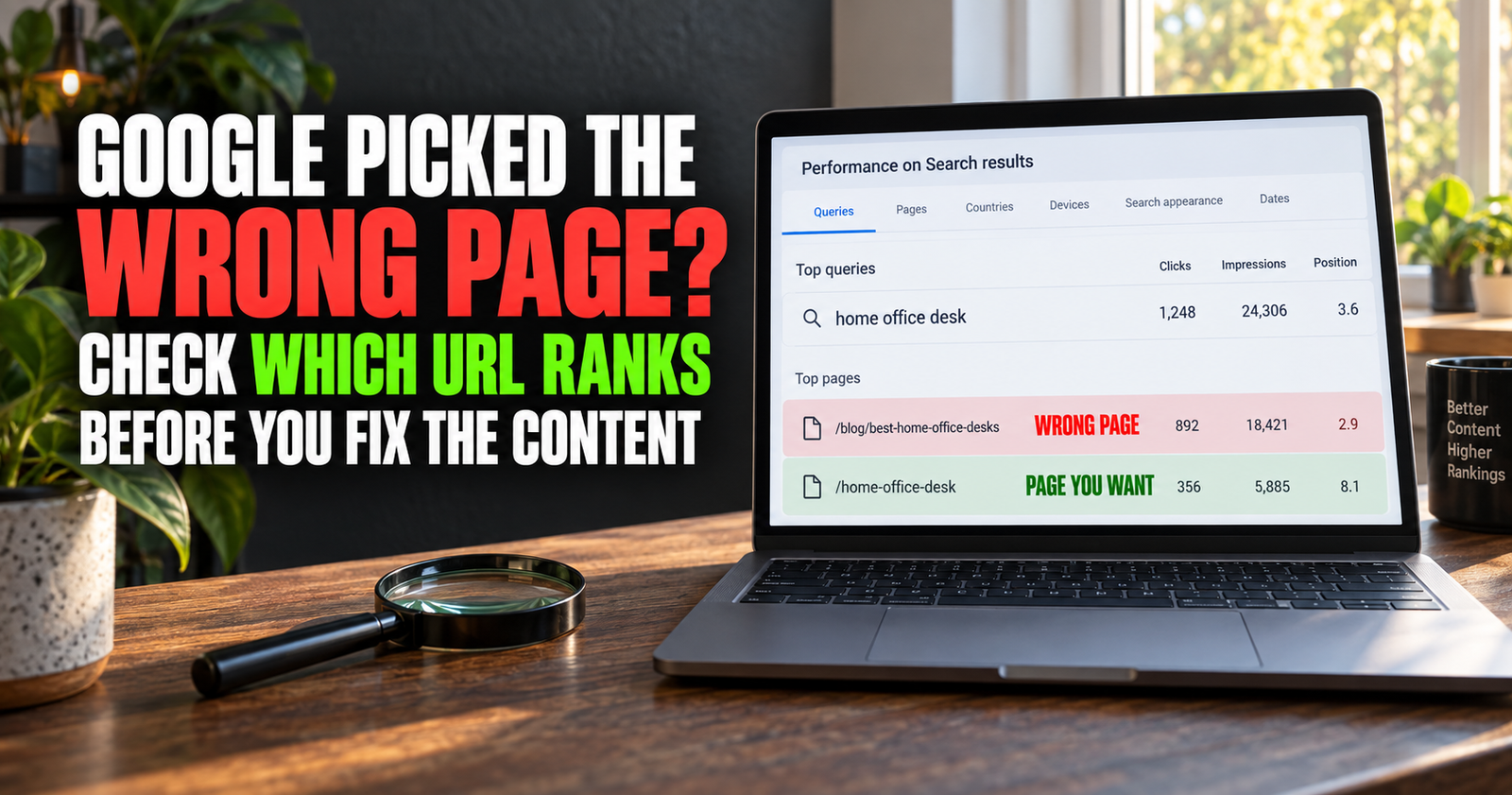
That last situation matters more than people think. If Google keeps showing a page that only mentions a subject in passing, it may be worth looking at how to check if Google is ranking the wrong page before you rush to create new content.
Watch for groups of similar questions
One long-tail phrase can be interesting. A group of similar phrases is usually more useful.
Let’s say you see these queries:
- why does my website have impressions but no clicks
- google search impressions but no visitors
- why am I getting impressions and no traffic
- lots of impressions but no clicks Search Console
Those are not four unrelated ideas. They are one reader problem described four different ways.
That tells you more than any single phrase could.
You may have a strong article opportunity, or you may discover that your existing page needs to use simpler, more natural language. Either way, the group helps you understand the reader’s wording.
You do not need to force every variation into the title or repeat them unnaturally throughout the article. Use the group to make the page more complete and more natural.

A helpful guide about having impressions but no clicks should make somebody feel understood whether they call the problem “no visitors,” “no traffic,” or “no clicks.”
Turn the right query into an article outline
Once you find a promising group of long-tail searches, do not start writing from the phrase alone.
First, write down what the person is really trying to accomplish.
For example, the query “how do I know if my SEO changes worked” is not just asking for a list of metrics. The reader wants to avoid guessing. They want to know how long to wait, what numbers matter, what to compare, and when not to overreact.
That is the real job of the article.
Then outline the answer around that job:
- What the reader is likely seeing.
- What the numbers can and cannot prove.
- What to check first.
- What changes are meaningful.
- How long to wait before judging the result.
- What to do next.
This keeps you from writing a thin article that repeats a keyword but does not solve the reason behind the search.

If you want to see this idea in action, how to tell if an SEO update is working is built around the real decision after making a change, not just a generic list of Search Console metrics.
Use the filter to improve old pages too
You do not have to use long-tail queries only for new articles.
Some of the best results come from improving a page you already have.
Maybe you see that an article gets impressions for a question it answers only halfway. You could add a clear heading, a practical example, a short checklist, or a link to a more detailed supporting guide.
That kind of update can make the page more satisfying for the reader without creating another URL that competes with it.
For instance, an article about finding ranking keywords may start getting impressions for searches about finding easy opportunities. If those phrases are a natural part of the same workflow, add a useful section. If they need their own decision process, a supporting article may be better.
This is why I think of Search Console as an editing tool, not just a report card.
What to ignore in the report
It helps to know what not to chase.
Ignore phrases that are clearly unrelated to your page or website.
Be careful with one-off searches that have a single impression and no related variations.
Do not make an article because a search phrase is oddly specific and sounds easy to target.
Do not assume an average position is a precise ranking you can check from your own phone. Search results can change based on the person, location, device, time, and search history. Google says as much in its Performance report documentation.
And do not turn every long phrase into a new article. That is how a small site becomes cluttered with pages that all feel like cousins.

If you are building out a group of related content, how to find content gaps on your website can help you tell the difference between a real missing answer and another page you do not need.
A simple monthly way to use this filter
You do not need to run this every day.
For most smaller websites, once a month is enough.
Choose one important category or a few pages that are already getting impressions. Set the date range to the last three months so you have enough data to notice patterns. Apply the four-word regex, sort by impressions, and write down only the phrases that meet all three conditions:
- They match the site’s audience and topic.
- They reveal a real question, problem, or decision.
- They are not already answered well by an existing page.
That small list becomes much more useful than an enormous keyword spreadsheet.
You can then decide which phrases become an update, which become a new article, and which ones are worth ignoring for now.
Frequently asked questions
Does this regex show hidden Google Search Console keywords?
No. It filters the query data Search Console already shows you. It does not reveal searches Google has withheld or hidden.
What does the long-tail keyword regex mean?
The filter ^([^ ]+ ){3,}[^ ]+$ means “show queries with at least four words.” The number three refers to the spaces between the first four words.
Should I use four-word or eight-word keywords?
Start with four words. It gives you more useful data while still filtering out many broad searches. Eight-word searches can be helpful, but smaller websites may not have enough data for that filter to be useful.
Can I use this on a new website with little traffic?
Yes, but do not expect a huge report. A new website may only show a few long-tail phrases at first. Use them as clues, not as a reason to force new content.
Do long-tail keywords always have low competition?
No. Longer searches are often more specific, but they can still be competitive. Check the search results, understand the intent, and decide whether your site can offer a genuinely better answer.
Should I write a new article for every long-tail query I find?
No. Some phrases belong as sections in a page you already have. Some point to a new article. Some are simply not worth pursuing. The goal is a better site, not the biggest possible article count.
Alden Whitaker writes practical, plain-English SEO guides for Make It Found that help small website owners make smarter content decisions without getting lost in agency jargon.