

A traffic drop makes people want to change everything at once.
New titles. New plugins. More posts. More links. A full rewrite of every page that used to do well.
I would not start there.
A Google search traffic drop is a symptom, not a diagnosis. Sometimes the cause is real and fixable. Sometimes it is seasonal demand. Sometimes Google changed which page it prefers. Sometimes Search Console is showing a shorter date range, or one page fell while the rest of the site is fine.
The first job is to find out what actually changed.
Start by making sure it is a real drop
Before treating the site like an emergency, compare equal time periods in Google Search Console.
Compare the last 28 days with the previous 28 days. Then compare the same period this year with the same period last year if you have enough history.
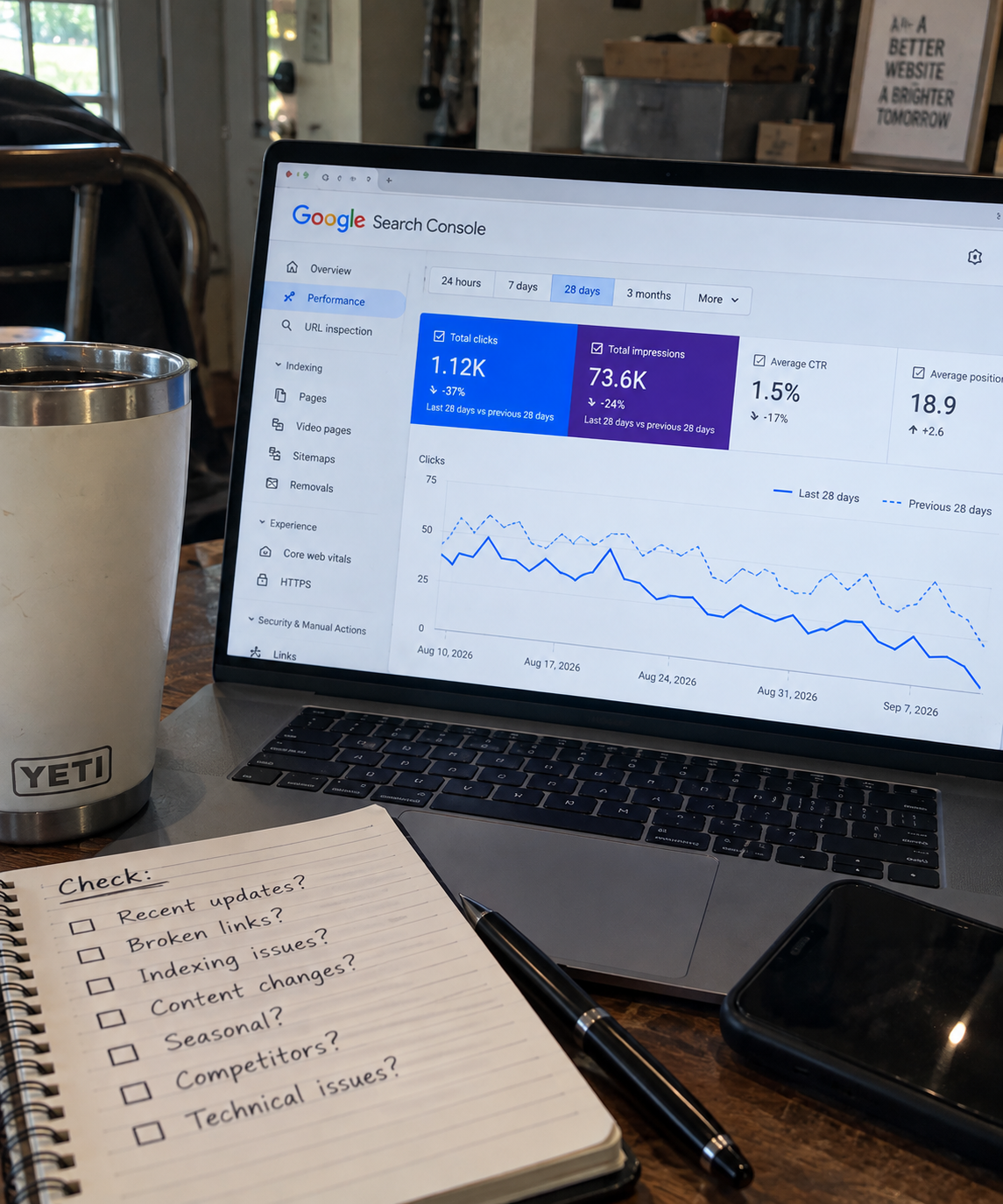
Do not compare a full month against three random days. Search traffic naturally bounces around. A small change is not always a problem.
Look at:
- Total clicks.
- Total impressions.
- Average position.
- The pages that lost the most clicks.
- The queries that lost the most clicks.
- Whether the decline happened suddenly or gradually.
A real decline usually becomes clearer when you stop looking only at the sitewide chart.
Find the pages causing the drop
A website can lose 30% of its search traffic because one big page slipped. That is very different from every page on the site losing a little visibility.
Open the Pages tab in Search Console and compare the date ranges. Sort by click difference.
You are looking for the pages that explain most of the decline.
Once you find them, ask:
- Did impressions fall too?
- Did average position drop?
- Did clicks drop while impressions stayed steady?
- Did the page disappear from the report entirely?
- Did another page on your own site start appearing for similar queries?
This is why I do not recommend reacting to a total-traffic number alone. The affected pages tell you where to look next.


If impressions and clicks both dropped
When both numbers fall, your page is probably appearing less often in search results.
That can happen because rankings fell, search demand changed, competitors improved, the page became less relevant, or Google began favoring a different kind of result.
First, review the lost queries. If the page lost visibility for searches it clearly deserves to answer, compare the current top results with your page honestly.
Is your article outdated? Is it less complete? Does the searcher now want a different format, such as a tool, a comparison, video, product page, or faster answer?
A drop in impressions is usually a relevance or visibility question before it is a title-writing question.
If impressions stayed steady but clicks dropped
This often means your result is still appearing but fewer people are choosing it.
Check the average position first. A small position change near the top can affect clicks a lot.
Then look at the search-results page. Ads, featured snippets, map packs, shopping results, video blocks, and stronger-looking titles can take attention away from an organic result.

This is where the guidance in why a website can have impressions but no clicks becomes useful. Your title may need a clearer promise, but the issue may also be a crowded results page or a search intent mismatch.



Check whether demand changed
Not every traffic drop is an SEO problem.
Seasonal topics rise and fall. News-driven topics cool off. Products go out of stock. A search phrase can lose demand because people stop needing the answer as often.
Search Console can show you whether impressions declined across the query itself. Google Trends can also help you see whether broader interest has changed.
Do not rewrite a good evergreen page because a seasonal topic is behaving like a seasonal topic.
Look for indexing and technical issues
If a page suddenly loses nearly all impressions and clicks, check whether Google can still access and index it.
Review these basics:
- The page still loads normally.
- It has not been set to noindex.
- Its canonical URL still points where it should.
- It has not been redirected by mistake.
- It is still included in your sitemap if appropriate.
- It has not been blocked by robots.txt.
- The content has not been accidentally removed or heavily changed.
Technical issues are less common than people think, but they matter when traffic drops abruptly and dramatically.
Watch for pages competing with each other
Sometimes the traffic did not disappear. Google simply started showing a different page from your site.
That can happen when two pages answer nearly the same question. One may replace the other in results, and neither performs as well as one focused, stronger page could.
Check whether another URL is now appearing for the lost queries. If it is, compare the two pages. Are they aimed at the same reader and the same outcome?

If so, you may need to clarify their roles, improve one page’s unique purpose, or combine them. Keyword cannibalization is not a penalty, but it can make your own content compete against itself.
Review the page before rewriting it
A traffic drop is a good reason to inspect a page. It is not automatically a reason to tear it apart.
Read the page from the searcher’s point of view.
Does the opening answer the question quickly? Is the information current? Are there missing steps? Is the page harder to read than the competitors? Does it lead naturally to other useful pages on your site?
A focused update can be enough. Add the missing information, correct old advice, strengthen the title, improve the opening, and reconnect the page where useful.

For pages that have become stale, deciding whether to update an old post or write a new one keeps you from creating another thin version of the same topic.
Do not chase every ranking wobble
Search positions move. A page may gain or lose a few spots without anything being wrong.
I pay more attention when the decline:
- Lasts for several weeks.
- Affects an important page or group of pages.
- Includes a meaningful loss of impressions.
- Matches an obvious issue on the page.
- Happens across a related topic cluster.
A one-day dip does not deserve panic. A steady trend with clear page-level evidence deserves a thoughtful response.
What I would do first
If my site lost search traffic, I would follow this order:
- Confirm the date range and size of the decline.
- Identify the pages responsible.
- Identify the queries those pages lost.
- Compare impressions, clicks, and positions.
- Check for technical issues if visibility vanished suddenly.
- Review the current search results and search intent.
- Make a focused improvement instead of a blind sitewide overhaul.
- Give Google time to recrawl and reassess the change.
That process is not flashy. It is how you keep a normal traffic fluctuation from turning into a month of bad decisions.
Frequently asked questions
Can Google traffic drop for no reason?
There is usually a reason, but it may be normal variation, seasonality, changing demand, or a small ranking shift rather than a serious problem.
How long does a Google traffic drop last?
It depends on the cause. A temporary fluctuation may recover quickly. A page that no longer matches search intent or has a technical issue will usually need a real fix.
Should I publish more articles after a traffic drop?
More content can help when it fills a genuine gap, but publishing unrelated posts will not automatically restore a declining page. Diagnose the drop first.
Can changing a title bring traffic back?
It can help if the page has strong impressions and weak clicks. It will not solve a page that is no longer ranking, is not indexed, or does not answer the searcher’s real question.
Alden Whitaker writes practical, plain-English SEO guides for Make It Found that help small website owners make smarter content decisions without getting lost in agency jargon.