
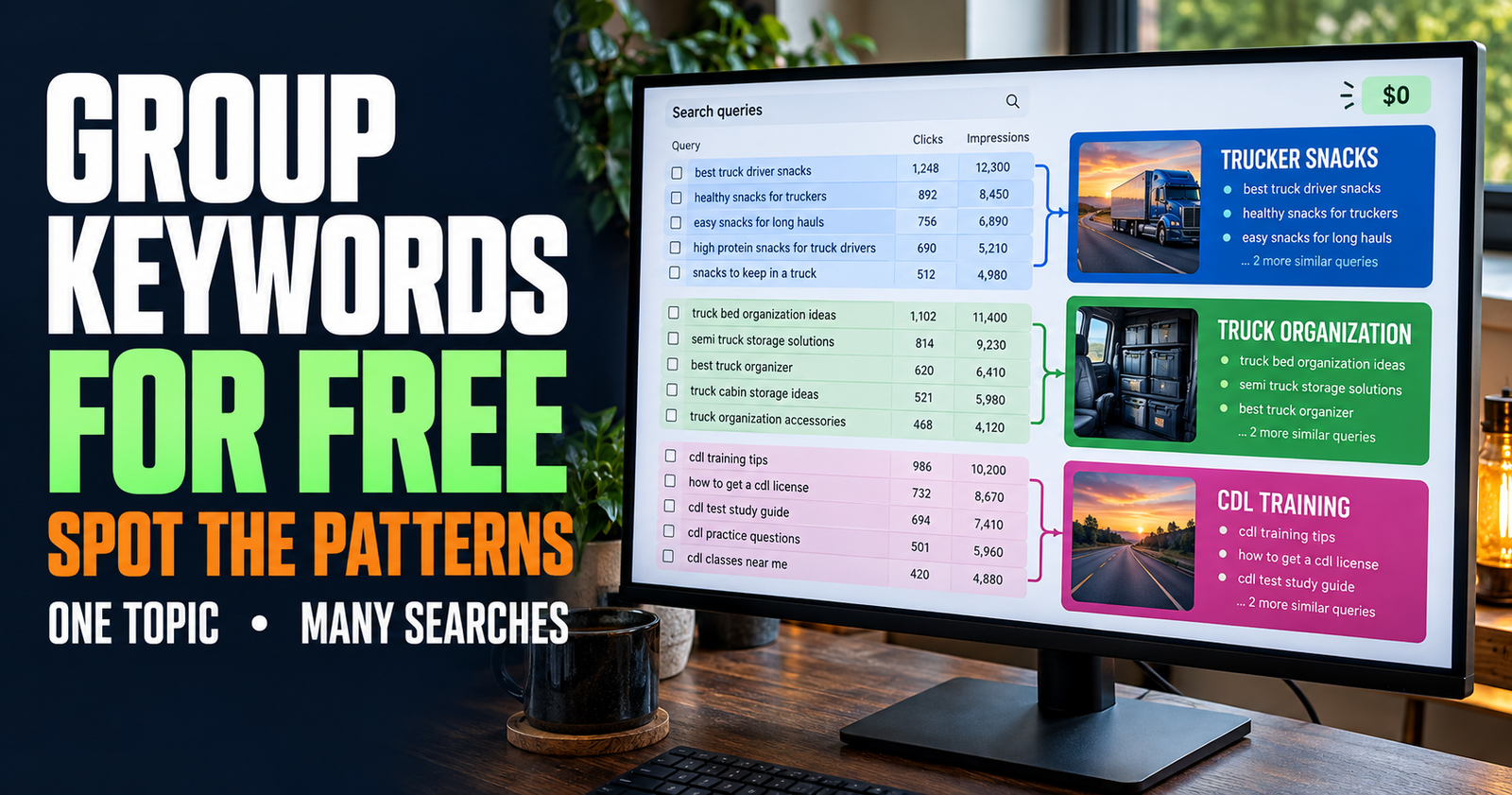
A Search Console query report can make a website owner feel like they just found a box of loose puzzle pieces.
There may be dozens of searches that look almost alike. Some use different words for the same question. Some sound similar but really need different answers. A few may have nothing to do with what you want your site to become.
The mistake is treating every query as its own article idea.
I have found that a much better use of Search Console is grouping those queries by the problem the person is actually trying to solve. That gives you cleaner pages, stronger internal links, and a lot less accidental overlap.
You do not need a paid keyword-clustering tool to begin. You need a simple way to look past the wording and ask what the reader needs at the end of the search.
Why similar keywords should usually live on one page
People do not all search the same way.
One person may type “why is my website not on Google.” Another may search “new site not showing up in search results.” Someone else may ask “why can’t I find my website on Google.”
Those are different phrases, but they are often the same beginner problem.
If you made three articles for those three wordings, the pages would likely repeat the same explanation. They would compete for the same purpose, confuse your internal linking, and make your site harder to maintain.

A better move is one genuinely helpful page that explains the possible causes, gives clear checks, and uses natural headings that answer the variations readers are searching. That is what a page like why a new website is not showing up on Google is meant to do.
Grouping similar keywords is not about stuffing all their exact wording into one post. It is about recognizing that several people are trying to get to the same answer.
What keyword grouping means in plain English
Keyword grouping means organizing phrases by search intent.
Search intent is the reason behind the search. It is what the person hopes to get, fix, compare, understand, or decide.
For example, these phrases can often belong together:
- what are Google Search Console impressions
- what does impressions mean in Search Console
- are impressions good in Google Search Console
- why am I getting impressions but no clicks
At first glance, they all contain the word “impressions.” But they do not all belong on one page.
The first three could fit under a beginner guide explaining impressions. The last one introduces a problem that needs diagnosis. That person does not only want a definition. They want to know why traffic has not followed the impressions.
That is where grouping becomes useful. It helps you see the point where similar wording turns into a different reader need.

If you want a simple foundation for recognizing those differences, search intent and why it matters for SEO is the place to start.
Start with one page or one topic at a time
Do not open Search Console, look at your entire website, and try to organize every query at once.
That gets overwhelming fast.
I would start with one page that already has some impressions, or one topic cluster you are actively building. Filtering by a single page makes it much easier to see what Google is connecting to that specific content.
For example, you may filter to one article about ranking keywords.
Then look at its queries and notice patterns. You may see searches that fall into groups like:
- How to find keyword rankings.
- How to find keywords without paid tools.
- How to tell which keywords are worth improving.
- Why a page ranks for a keyword but gets no clicks.
The first two may be close enough to belong in the same broad workflow. The last two are likely different jobs and may need separate pages.
Google’s Performance report lets you look at both query and page data, which is why it is so useful for this kind of work. Google explains those report dimensions and metrics here.
Group by the reader’s question, not the repeated word
Repeated words can fool you.
A page about “website traffic” may rank for many phrases containing the word traffic:
- why did my website traffic drop
- how to get first 100 website visitors
- why does my site have no traffic
- how much website traffic is good
All of those phrases share a word. They do not all share one purpose.
The first is troubleshooting a decline.
The second is about early growth.
The third is a broad problem with several possible causes.
The fourth asks for a benchmark.
Trying to fit all four into one article would create a mushy page. It would be hard to title honestly, hard to organize, and hard for a reader to use.
This is why I group queries by the question underneath the keyword.
Ask yourself, “If I were answering this person face to face, would I give the same explanation and next steps as I would give the person searching the other phrase?”
If yes, group them.
If no, separate them.



Use the “same finish line” test
This is the fastest test I know for deciding whether phrases belong together.
Write a plain sentence for each query that begins with:
“This person wants to…”
Here is an example:
“This person wants to know why their page is indexed but not ranking.”
“This person wants to know how long a new page takes to rank.”
“These people both use the word ranking, but they do not have the same finish line.”
The first reader wants a diagnosis. They may need to check relevance, competition, page quality, internal links, and whether Google chose the right URL.
The second reader wants a realistic timeline and a way to recognize progress.
The pages can link together, but they should not be combined just because the words look alike.

A clean article about a page that is indexed but not ranking can answer the first need without turning into a vague SEO-timeline article.
A simple way to organize your query list
You do not need fancy software for this. A blank spreadsheet, notes app, or piece of paper works fine.
Create four working groups:
- Same question, different wording.
- Related question that needs a different page.
- Existing page that needs a better section.
- Ignore for now.
As you look through your Search Console queries, drop each phrase into one of those groups.
Do not worry about making the first pass perfect. The goal is to stop treating every phrase as equally important.
For example, phrases like “how to find low-hanging fruit keywords,” “easy keywords to rank for,” and “keywords my site almost ranks for” may all point toward the same decision: how to find an opportunity where your site already has some footing.
That is one page job. It does not need three separate articles.
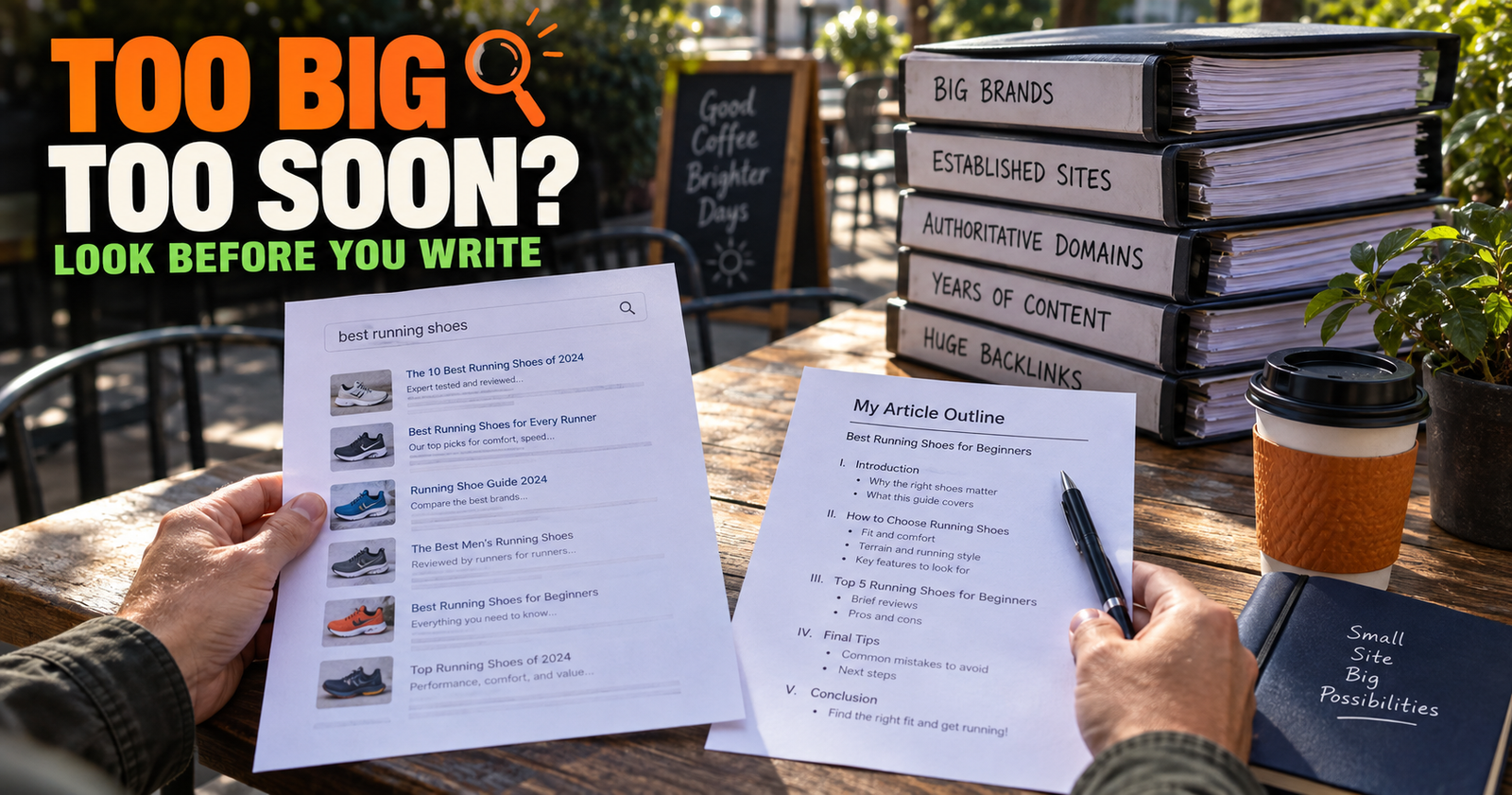
On the other hand, “is this keyword too competitive for a new website?” is a different decision. It needs a different explanation about what the search results look like, what kinds of competitors are present, and whether your site can honestly offer something useful. That deserves a separate destination, like how to tell if a keyword is too competitive.
Look for query families, not one-off phrases
A keyword family is a group of searches that describe the same concern in slightly different language.
Here is a fictional example:
- Google impressions but no visitors
- Search Console impressions no clicks
- why am I showing up on Google but nobody clicks
- lots of impressions no traffic
Each phrase is different, but the reader is in the same situation.
They are seeing visibility without visits.
That is a strong sign you need one thorough article that explains possible causes, how to check the page and the search result, what to improve, and when not to panic.
The phrase with the most impressions does not have to become the exact article title. Sometimes the clearest title uses words people naturally understand, while the supporting headings and examples cover the related language.
That is more useful than building a page around the stiffest exact-match phrase.
Use regex to make longer query families easier to spot
The long-tail regex filter we just covered can make this process faster.
It helps you remove many of the very broad searches and look at the longer phrases where people explain more of what they want. A search that contains four or five words often gives you enough context to see the reader’s real question.
For example, a short search like “SEO traffic” is hard to group.
A longer search like “why is my new site getting no traffic” is much easier to place. It is probably a beginner troubleshooting question, not a generic traffic topic.
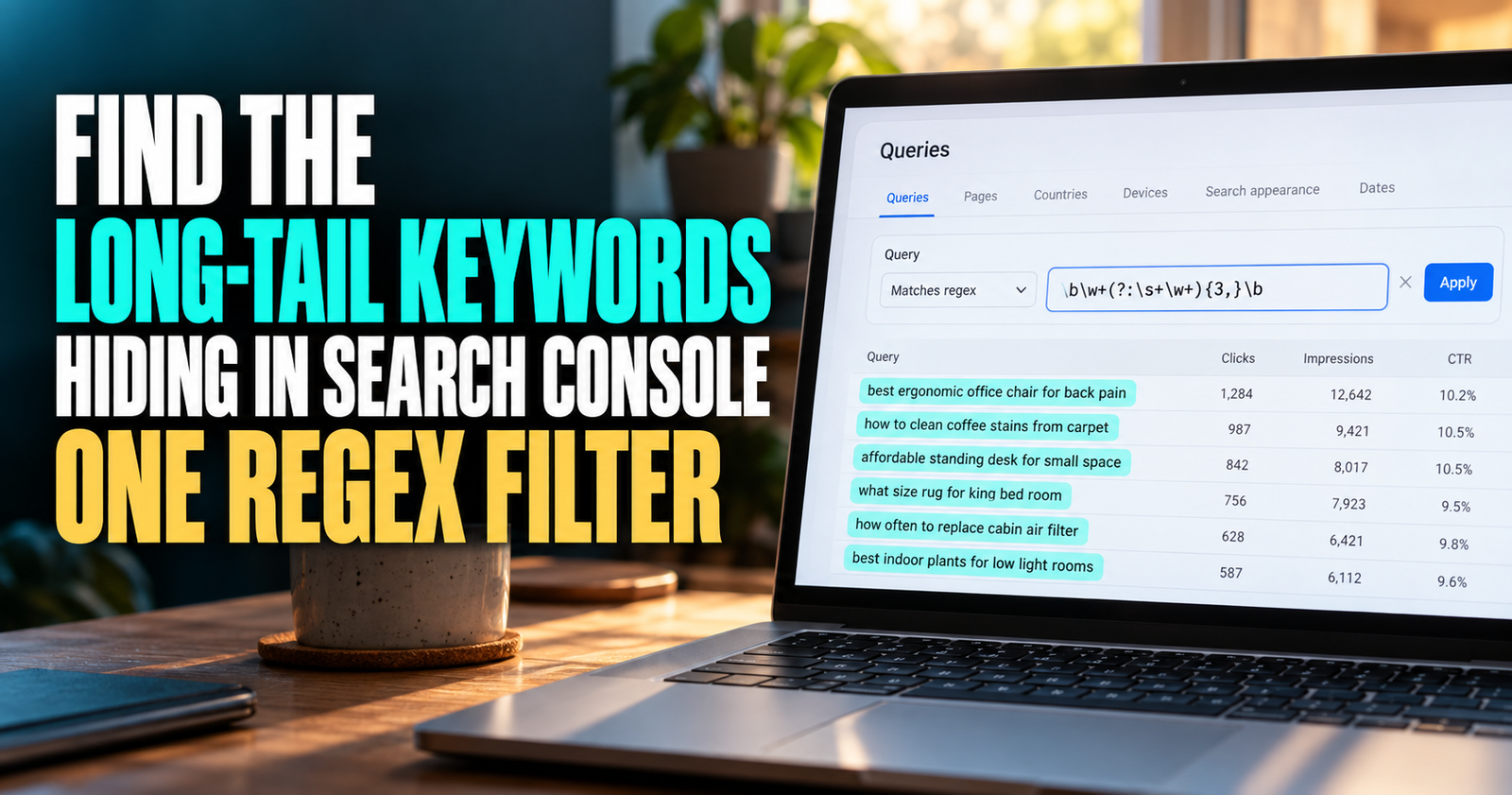
You can use the simple filter in how to find long-tail keywords in Search Console with regex before you start grouping. It does not reveal secret Google data, but it can make a messy query list easier to work with.


Watch for the point where one group becomes two
This is where people either build a strong site or start building duplicate content.
A group of similar queries should split into separate pages when the answer changes direction.
Take these searches:
- What do impressions mean in Google Search Console?
- Are impressions good in Google Search Console?
- Why do I have impressions but no clicks?
- How do I get more impressions in Google Search Console?
The first two are beginner interpretation questions. They can usually live together.
The third is a problem page.
The fourth is a growth-strategy page.
The terms overlap, but the article promises do not.
If you force all four questions into one post, readers may have trouble finding the help they came for. You may also create a title that tries to promise everything and ends up sounding like nothing.

That is why what impressions mean in Google Search Console should not try to do the work of a full troubleshooting guide about no clicks.
Check Google’s results before you combine topics
Search Console shows you what your site is appearing for. Google’s actual results can help you understand whether people expect the same type of answer.
Search two queries you are thinking of grouping.
Do the top results mostly answer the same question?
Do they have the same type of title and page format?
Would a person who searched the first phrase be happy landing on a page built for the second?
If the answers are mostly yes, combining may make sense.
If one search brings up explainers and the other brings up checklists, tools, comparisons, or troubleshooting guides, the intent is probably different enough to separate.
Do not take search results as a perfect command. Results can change based on location, device, and search history. But they are still a good reality check when you are unsure whether two phrases really belong on the same page.
Do not group phrases that need different actions
This is a simple rule that prevents a lot of weak content.
If two readers would need different actions after reading the answer, they usually need different pages.
For example:
A person asking “what is average position?” needs an explanation of the metric.
A person asking “how do I improve average position?” needs a process for choosing pages, improving relevance, looking at search intent, and tracking changes over time.
The first person learns what a number means.
The second person needs a plan.
Related? Yes.
Same page? Usually not.
This is where I see new site owners get frustrated. They have one broad article with lots of headings, but none of the headings go deep enough to help a reader make a decision.
A smaller number of focused pages works better than one giant article that tries to own every phrase in a topic.
Make one page the clear home for each query group
After grouping the phrases, choose the page that should be the clear home for that topic.
This matters whether you are creating a new article or improving an old one.
The home page should have the most complete answer, the clearest title, and the strongest internal links pointing toward it from related pages.
That does not mean every related phrase has to rank on that one URL. Google can show different pages for different searches. But you should be able to explain what each article is for.
For example:
- A page about finding your ranking keywords is the home for discovering the data.
- A page about low-hanging-fruit keywords is the home for prioritizing opportunities.
- A page about a new post versus a new section is the home for deciding where the idea belongs.
Those pages form a useful sequence instead of fighting for the same job.

If you notice two URLs are trying to be the home for the same query family, that is a sign to inspect possible overlap. Keyword cannibalization is not always the reason a page underperforms, but unclear page jobs can make it harder for readers and search engines to understand your site.
Improve an existing page when the group fits naturally
A group of new queries does not always mean you need a new article.
Sometimes it means your existing page is almost there.
Suppose your article explains what search intent is. Search Console shows it getting impressions for:
- How do I know search intent?
- How to check what people want on Google.
- How to tell informational and commercial keywords apart.
Those are natural sub-questions inside the same beginner topic. Adding a clear section, a simple example, and better headings may make the page much stronger.
Creating three articles for those phrases would likely cause more confusion than value.
Before publishing anything new, compare the reader’s goal with the existing page’s promise. If the reader would expect the answer inside that page, add the section there.
Create a new article when the grouped queries open a new decision
A new page makes sense when the query family exposes a question your existing content does not really answer.
For example, you might have a page explaining how to find keyword ideas in Search Console. Then you notice a group of phrases about deciding whether a query needs a new article, an updated article, or just a short section.
That is not just another keyword-idea question. It is a content-planning decision. It needs its own examples and framework.

That is why how I find blog topic ideas in Google Search Console and how to find content gaps on your website can work together without being copies.
One helps you find clues.
The other helps you recognize missing answers.
A good cluster gives readers a next step when their question changes.
Do not let low impressions make you ignore a useful pattern
Smaller sites will often see low numbers in Search Console. That is normal.
A group of related phrases with only a few impressions each can still tell you something useful. Especially when the searches all point toward a clear question your audience is likely to have.
The key is not pretending a handful of impressions proves huge demand. It does not.
The key is noticing a useful signal and checking whether it fits your site, your audience, and the pages you are already building.
Sometimes the best next article is supported by Search Console data. Sometimes it is supported by common sense about what a reader needs after the article they just read. The strongest content planning uses both.
Keep your internal links aligned with the groups
Once you know which page owns a query group, internal links become much easier to write naturally.
A page about impressions can link to the troubleshooting article when the reader’s question becomes “Why am I not getting clicks?”
A page about keyword ideas can link to a prioritization article when the reader asks “Which one should I work on first?”
A page about content gaps can link to the new-post-versus-new-section guide when the reader knows what is missing but is unsure where it belongs.
Those are useful links because they follow the reader’s train of thought. They are not links placed just because two articles share the word SEO.
A simple monthly query-grouping routine
You do not need to make this a huge project.
Once a month, choose one cluster or a few pages with growing impressions.
Open the Queries report for one page at a time. Use the long-tail filter if it helps. Copy only the phrases that sound like real questions into a note.
Then group them by what the reader wants to accomplish.
For each group, make one decision:
- The existing page already covers this.
- The existing page needs a better section.
- This needs a separate article.
- This does not fit the site and can be ignored.
That simple routine will help you find smarter updates and article ideas without turning your site into a collection of near-duplicate keyword posts.
Should every similar keyword go in the same article?
No. Similar wording does not always mean the same search intent. Group phrases only when the reader needs the same core answer and next step.
How many keywords should one article target?
There is no useful fixed number. A page should cover the natural ways people ask the same question without drifting into unrelated decisions or problems.
Can Google rank one page for many keyword variations?
Yes. One strong page can rank for many related searches when it gives a clear, useful answer that matches what those searchers need.
What if two of my pages rank for the same keyword group?
Compare their titles, purpose, headings, and Search Console data. Decide which page should be the stronger home for that topic, then improve the division between the two pages.
Do I need a paid keyword clustering tool?
No. Paid tools can save time on bigger websites, but a small site can group queries effectively by looking at intent, the reader’s next step, and the page that best answers the question.
Alden Whitaker writes practical, plain-English SEO guides for Make It Found that help small website owners make smarter content decisions without getting lost in agency jargon.